


 By neha - July 10, 2026
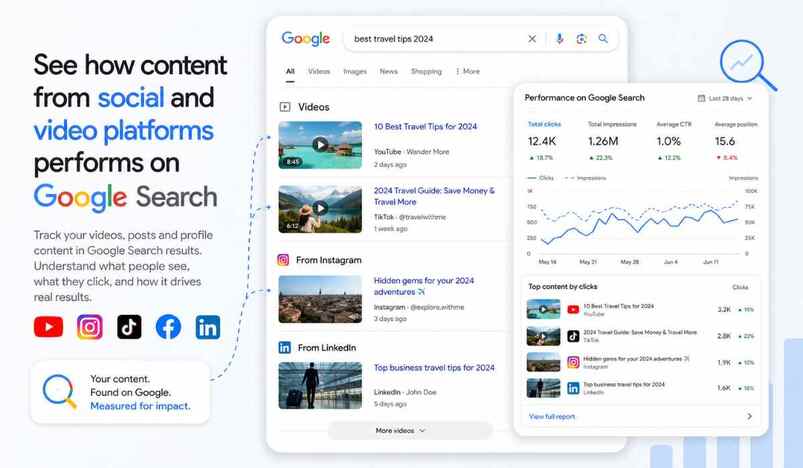
Google just changed how creators see their reach. On July 7, 2026, Google rolled out a fresh Search Console property type. It is called platform properties. This update tracks your social media performance directly inside Google Search Console.
What Are Platform Properties?
Search Console used to work only for websites you own. You needed a domain and proof of ownership. That rule no longer applies here.
Platform properties let you connect a social or video account instead. You do not need a website at all. Google built this for creators who post but never built a site.
Which Platforms Are Supported?
Four platforms launched with this update. They are Instagram, TikTok, X, and YouTube. Each one gets its own dedicated property inside Search Console.
You simply add the account you want to track. Google then pulls in search data tied to that specific profile.
What Data Do You Actually See?
You get total clicks and impressions from Google Search and Discover. You can filter this data by post or by search query. That means you can find your best performing post fast.
You also see which queries send people to your content. This helps you understand what your audience actually searches for.
Why This Update Matters
Search Console has always focused on owned websites. Social content lived in a separate world before now. Brands split their attention between platform apps and Search Console.
This update tracks your social media performance in one clear place. It connects social discovery to actual search behavior. That link was missing for years.
Who Should Use This First?
Creators without a website benefit the most right away. They finally get real search visibility data for their posts. Brands running active social accounts should also check this.
Agencies managing multiple client accounts gain a faster way to report results. Everyone gets a clearer picture of off-site search demand.
How to Get Started
Open Search Console and look for the property selector. Click "Add property" and choose your platform. Follow the verification steps Google shows you.
The rollout is happening gradually over several weeks. Check your account regularly if you do not see the option yet.
Frequently Asked Questions
Q: Does this replace website Search Console properties?
No, it works alongside your existing website property. Both property types live in the same Search Console account.
Q: Does it track in-app engagement like likes?
No, it only tracks how Google Search and Discover send traffic. In-app metrics still come from each platform's own analytics.
Q: Is a website required to use this feature?
No, that is the entire point of this update. Creators without any website can now track their search visibility.
_27-51-2026_11-51.png)
_27-43-2026_12-43.png)

_03-27-2026_08-27.jpg)
.jpg)


.jpg)
.jpg)




.jpg)


.jpg)
.png)
.jpg)













Leave a comment